
Automate your e-commerce catalog with AI: product pages, ERP data and translations
 Jessica Santiago
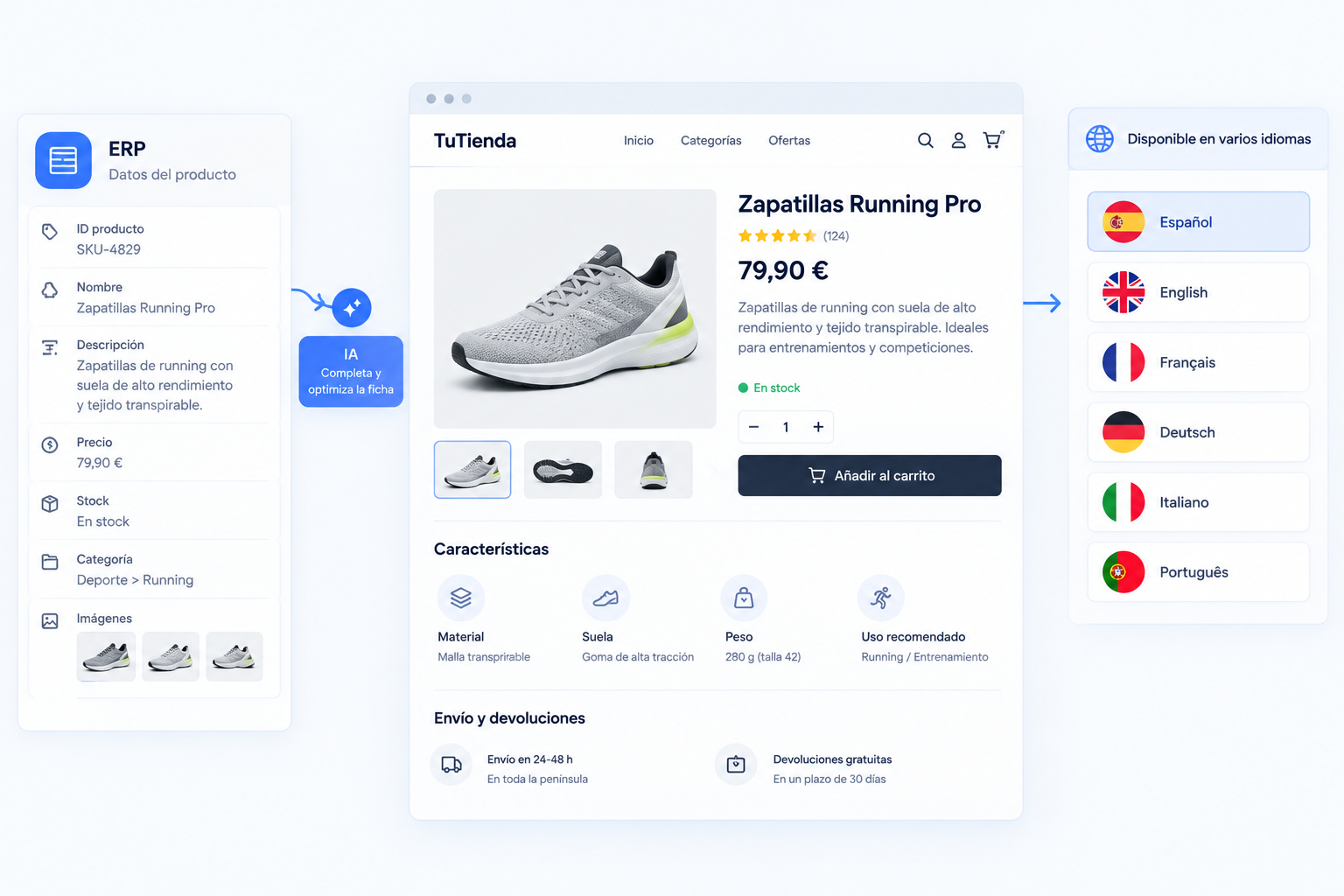
Your ERP has the information for a product. The online store has the SKU and the price, but not the description. The French version is still pending, and someone on the team is hunting for the spec sheet to fill in the dimensions.
With ten products, that takes a little while. With a thousand, it takes days. And when the catalog changes all the time, finishing once isn’t enough: you have to go back over the data, update the copy, and check that every language is still up to date.
It’s one of the problems we see most often in online stores with large catalogs. There’s usually no shortage of people willing to do the work. What breaks down is the connection between systems and the number of manual tasks that pop up in between.
AI can generate product pages, adapt copy, and translate. But automating a catalog doesn’t mean asking it to write thousands of descriptions and publishing them without looking. You also need to connect the sources, validate the data, and decide what updates on its own and what needs review.
Let’s look at where the time goes, which parts of the catalog you can automate, and how we’ve applied this in three real projects.
Where the time goes in an online catalog
Before you choose tools, figure out what your team is doing by hand. These are the four problems that come up most often.
1. The ERP doesn’t send all the data the store needs
The ERP is usually the reference for commercial and operational information, but the store needs more: dimensions, materials, compatibility, images, or the attributes the search engine uses. Someone has to track them down and fill in what’s missing.
And it’s not just time. If the data comes from several sources, you have to check that it belongs to the right product and doesn’t contradict what’s already there.
2. Product pages are written one by one
With a small catalog, writing by hand lets you give each product proper attention. With thousands of SKUs, keeping up the quality and consistency is another story: some pages explain everything, others have two lines, and others copy the manufacturer’s text word for word.
AI speeds up the writing, but it needs reliable data and clear instructions. If every page comes out of the same template without accounting for the differences between products, you end up with a catalog full of copy that all sounds the same.
3. Languages fall behind
A multilingual store isn’t translated once and done. Every change reopens the work. The Spanish description gets updated and the French one keeps the old text. A technical feature gets added and only reaches some languages. In the end, customers in different countries read different things about the same product.
4. Errors reach the store
A product with no main image, a required attribute left blank, or a description that doesn’t match the SKU. It goes unnoticed until a customer tries to buy it.
Checking every field of every product by hand isn’t realistic. Publishing without checks isn’t either. This is where validation rules matter as much as the AI.
Which parts of the catalog you can automate
The best solution usually combines pieces: some tasks are handled with rules, others need AI, and others need a person to sign off on the result.
1. Completing and validating product data
It’s a good place to start because it doesn’t involve generating any copy. The system checks the available data, spots the missing fields, and fills them in if there’s an authorized source. If it can’t find one, it leaves the product on hold and sends an alert.
For example, you can set rules like these:
- If the main image is missing, the product isn’t published.
- If the price isn’t valid, the update stops.
- If a required attribute for that category is missing, a ticket is opened.
- If the SKU already exists, it’s updated instead of duplicated.
They’re simple, but they stop a lot of errors from spreading. And one important point: filling in a field doesn’t mean making it up. If there’s no reliable information about the material or the dimensions, the automation should flag that it’s missing, not fill it with a guess.
2. Generating product pages from technical data
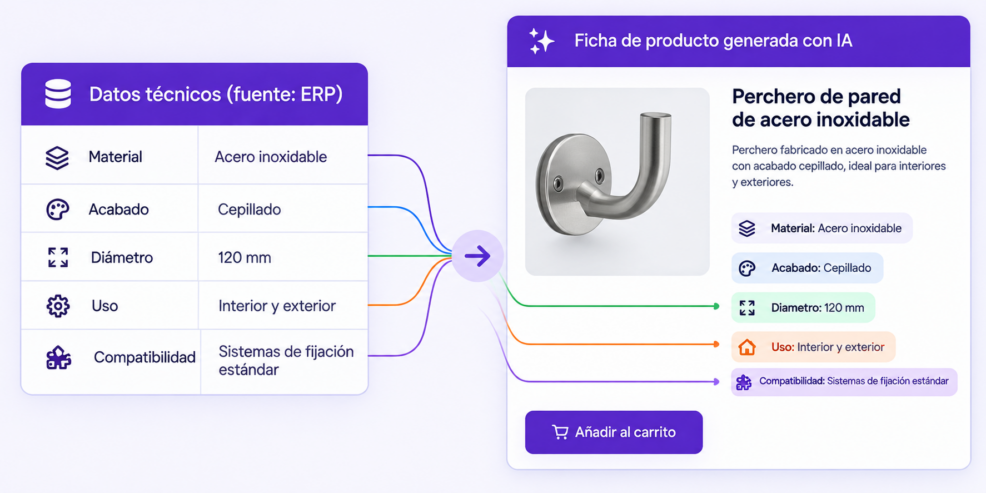
This is where AI saves writing time. Instead of a person reading the spec sheet and writing from scratch, the system gathers the data and asks the AI to turn it into clear copy in the store’s style.
Say the source contains: material, stainless steel; finish, matte; diameter, 12 cm; use, indoor; compatibility, with the models listed on the spec sheet. With that, the AI can write a readable description and highlight what helps the customer decide to buy.
The condition: the copy sticks to the source data. If the spec sheet doesn’t say the product is water-resistant, the description shouldn’t claim it is. If a dimension is missing, it shouldn’t infer one.
To keep this in check, define a structure for each category, limit claims to the information available, validate the technical fields separately from the sales copy, and review the first batches before scaling up.
3. Translating product pages and keeping them in sync
Machine translation doesn’t add much if it only helps at launch and nobody maintains the versions afterward.
A well-designed workflow starts from a reference product page and records which translation matches each version. When the original changes, the system marks the affected languages as pending, the AI generates the new translations using each language’s terminology, the required fields are checked for completeness, and the pages are either published or sent for review, depending on the rules.
Not all copy needs the same level of review. A simple description can follow a different workflow than a page with safety warnings or sensitive specifications. What matters is always knowing which version is up to date and which isn’t.
4. Reviewing the catalog on a schedule
Even if the initial import works, errors show up later: a field changes in the ERP, an image disappears, or an update stops running.
That’s why, besides automating data entry, it’s worth scheduling regular checks that look for incomplete attributes, empty descriptions, conflicting data, or SKUs that should be unpublished. Depending on the case, the system fixes a format, updates a field from the reference source, or opens a ticket. In the Tiko Doco project, for example, the catalog is checked every 30 minutes.
5. Improving the store’s internal search
If a product has complete attributes that are consistent with the rest of its category, it’s easier to filter and find. If the store uses different names for the same material or leaves fields blank, the search engine loses accuracy.
Automation helps standardize attributes and catch inconsistencies, and AI can interpret natural-language searches if the store has a solution that supports it. But don’t mix up the two: a well-completed catalog improves the foundation for search, but on its own it doesn’t guarantee better results. The engine, how it’s configured, and how it interprets queries also play a part.
How catalog automation works from start to finish
Here’s an example: a new product is added to the ERP and has to reach a Shopify store with all its information.
- Detect the product. The integration picks up the new SKU or a change to an existing one.
- Collect the data. It queries the ERP and the additional sources: spec sheets, supplier files.
- Validate the information. It checks the required fields and the category rules. If something essential is missing, the product stays on hold.
- Generate the content. If there’s enough data, the AI prepares the description and the translations.
- Review the result. Sensitive content, or anything that fails validation, goes to human review.
- Update the store. The integration sends the authorized fields to Shopify and logs the result.
- Confirm everything finished correctly. If a connection fails or a field doesn’t update, the issue is logged and the step can be retried in a controlled way.
A platform like n8n can coordinate the steps and connect the systems. The exact architecture depends on the available APIs and the permissions of each tool. And that last point matters: an automation isn’t done when it sends the information; it’s done when it knows the information arrived correctly.
Three real catalog automation cases
There’s no one-size-fits-all solution for online stores. These three projects started from very different needs.
Tiko Doco: filling in the data the ERP doesn’t sync
Tiko Doco needed to complete product information in Shopify that wasn’t coming through from its ERP.
To solve it, a custom app integrated with Shopify was built. The solution fills in the data and checks the catalog every 30 minutes. According to the project information, it can process more than 20,000 complete products in each import and prevents incorrect products from being published.
The interesting part is that the problem wasn’t solved simply by generating descriptions with AI. First, they had to make sure the necessary data reached the store and that the catalog was checked on a recurring basis.
Read the Tiko Doco case study.
Fesmés: turning SAP data into product pages
Fesmés worked with technical data stored in SAP that had to be turned into product pages shoppers could understand in the online store.
The solution connects AI to SAP to generate product pages and improve the information available for search within the store. This way, the team can work with a more consistent catalog and update SKUs faster.
The key here is making use of the information that already exists in the management system and turning it into useful content for the buyer, without treating each SKU as a separate writing job.
Establiments Andreu: keeping the catalog up to date while adding languages
Establiments Andreu needed to make it easier to take its online store international. Translating the catalog and keeping it up to date by hand made it hard to add more languages.
The solution automates translation and store syncing, cutting the work needed to maintain the different language versions.
In this kind of project, the challenge isn’t just producing translations. You also need to know which text is the original, which version belongs to each language, and how to roll out changes without leaving outdated pages behind.
Read the Establiments Andreu case study.
All three projects share one idea: automation starts from a specific catalog problem. AI is one piece of the solution, not a substitute for designing the process.
Which tasks you can automate and which ones to review
Not all data carries the same risk. Standardizing an attribute’s format isn’t the same as changing a technical specification or a price.
Use this table as a starting point; the level of control should match the information and the consequences of each error.
| Task | Recommended approach | Control |
|---|---|---|
| Standardize formats and attributes | Rule-based automation | Regular checks and a change log |
| Fill in fields from a reliable source | Rule-based automation | Verify the source and catch inconsistent values |
| Generate sales descriptions | AI with validations | Review the first batches and spot-check results |
| Translate standard product pages | AI with validations | Review key copy and check terminology consistency |
| Publish safety or regulatory information | Workflow with approval | Human review before publishing |
| Update prices and stock | Sync from the designated source | Explicit rules, error handling, and update limits |
The rule of thumb is simple: automate what you can verify, and decide who needs to step in when the system doesn’t have enough information.
If a product needs a technical warning that doesn’t appear in the available data, it shouldn’t be published just because the AI managed to write convincing copy. And if a price update doesn’t meet the business rules, the workflow should stop instead of improvising.
How to start without automating the whole catalog
You don’t need to transform thousands of SKUs on day one. In fact, starting with a single category makes it easier to catch errors before they affect the whole store.
1. Pick a pilot category
Look for a product family with enough volume that the manual effort is significant, but small enough that you can review it in a controlled way.
It could be a category with lots of incomplete product pages, similar products, or pending translations. The important thing is to choose a problem you can measure.
2. Check where the data comes from
Before building the automation, identify which system holds each piece of data and how it can be accessed.
Look into the integration options for the ERP and the e-commerce platform. Also check whether the spec sheets and supplier files have a structure you can work with.
If you don’t know which source should win when two systems show different values, settle that question before you automate.
3. Define the publishing rules
List the required fields, the data that must come from a specific source, and the cases that need approval.
For example, you can let a standard description be generated automatically, but require a review when an important technical detail is missing or the product includes specific warnings.
4. Test with a small batch
Start with a few dozen SKUs and review the results. Check the descriptions, translations, attributes, images, and syncing with the store.
Include both normal and problem cases: products without enough data, duplicate SKUs, long texts, or later changes in the ERP.
The test lets you check both the quality of the content and how well the integrations work.
5. Measure before you scale
To know whether the project pays off, track metrics such as:
- Average time spent completing a product page.
- Percentage of products that meet the publishing requirements.
- Number of errors caught before publishing.
- Time needed to update translations.
- Sync issues between the ERP and the store.
Compare these results with how things were before. That way you can decide whether to extend the automation to other categories or fix the existing workflow first.
A catalog that doesn’t depend on copy and paste
As the catalog grows, the work doesn’t end once the products are published. You have to fill in data, update product pages, keep translations current, and check that the systems are still in sync.
Automating these tasks can free your team from much of the repetitive work and reduce errors, as long as the workflow has clear data sources, validations, and a system for handling exceptions.
The best way to start is to review your current catalog: how many SKUs it has, what information is missing, where the data comes from, and which tasks repeat every time a product is updated.
At La Teva IA, we build automations that connect business tools, data, and processes. If your team spends too much time maintaining the store’s catalog, we can look at which parts are worth automating and which should stay under supervision.