
AI automation for businesses: which processes to automate, how to do it and when it pays off
 Jessica Santiago
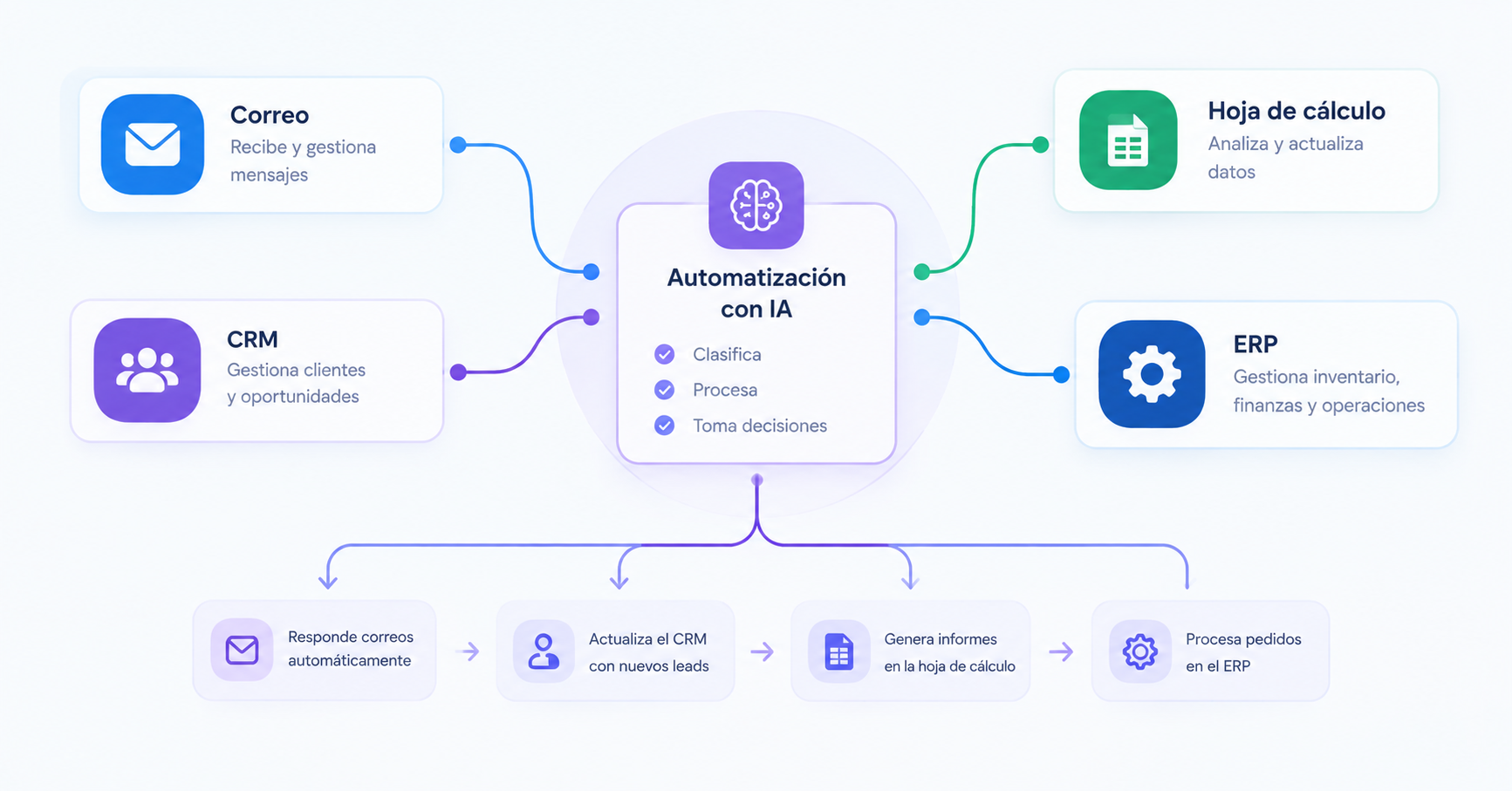
Whenever someone talks about automating with artificial intelligence, the answer always seems to be an autonomous agent that does everything. But when you look at how a business actually runs day to day, the problems are a lot less spectacular.
A salesperson copying details from a form into the CRM and then drafting an email. Someone in accounting downloading invoices and typing the data into the business management software. A customer service team answering the same question twenty times a day. Or an entire morning spent putting together a report from data that already lives in four different tools.
Can all of this be automated? In many cases, yes. Do you need AI to do it? Not always.
And that distinction matters more than it seems. In the projects we work on, the first conversation is almost never about which tool to use, but about which task is worth no longer doing by hand. Automating a process that adds little value, or overcomplicating with AI something a simple rule can handle, can cost more than it saves.
Let’s look at which processes are worth automating, five end-to-end examples, when you need AI and when you don’t, and how to work out whether it pays off.
1. Which processes are worth automating
Before choosing a tool, look at what happens day to day. You don’t need to start with a huge process. Often the best opportunities are in those small tasks that come up so often the team no longer even questions them.
To spot a good candidate, look at four things:
- Frequency: is it done every day or several times a week?
- Time: how many minutes does it take each time, and how much does that add up to per month?
- Repetition: does it almost always follow the same steps?
- Errors and delays: what happens when someone forgets, enters the wrong data, or doesn’t get to it in time?
And add a fifth question: what happens if the automation gets it wrong? Misclassifying an inquiry is not the same as sending an incorrect quote or making a payment.
A frequent, repetitive task that’s easy to check is a good candidate. If a mistake would also have serious consequences, you’ll need more checks in place before automating it.
Run the numbers before you start
Imagine someone spends 15 minutes logging and classifying each sales lead. Twelve come in per day, and there are 22 working days a month. That’s 180 minutes a day and 66 hours a month spent on that task.
That doesn’t mean you’ll get all 66 hours back: there will always be exceptions, oversight and maintenance. But you now have a baseline for evaluating the project. And add in what doesn’t show up in the math: replying to a potential customer sooner, making fewer mistakes, making sure no lead gets forgotten in an inbox.
A good automation isn’t justified because it uses AI, but because it improves a process you can describe and measure.
2. Five processes you can automate with AI
Every business is different, but these five cases come up again and again. They’ll help you recognize common situations and see what an automation would do from start to finish.
Logging, classifying and following up on leads
When a lead comes in through the website, someone has to review it, log it in the CRM, understand what they need and decide who handles it. At low volume, doing this by hand is fine. The trouble starts when leads come in through several channels and follow-up depends on someone remembering.
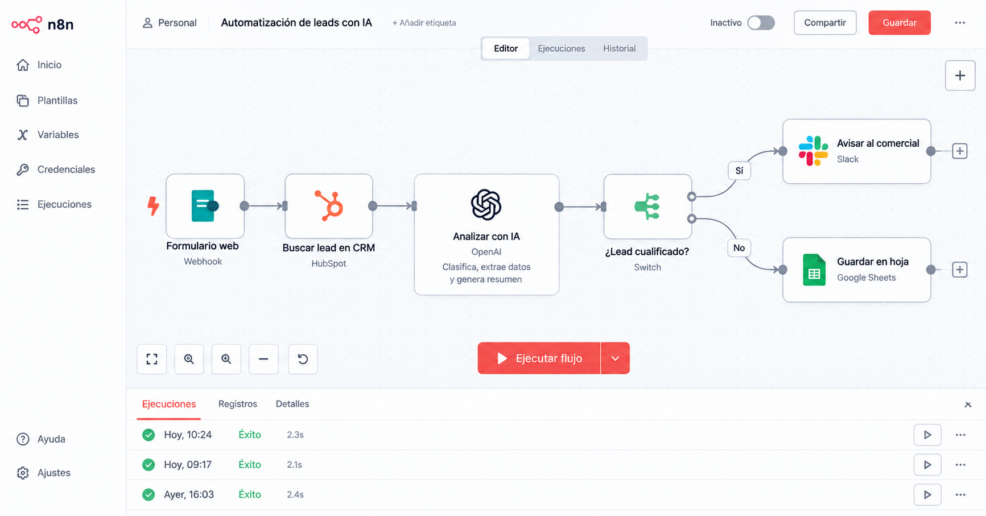
An automated workflow could work like this:
- Someone fills out a form or writes to the sales team.
- The automation captures their details and checks whether they’re already in the CRM.
- AI interprets the message and pulls out what matters: product, need, timeline.
- The system assigns a category and suggests the next step based on defined rules.
- The CRM is updated and notifies the right salesperson.
- If information is missing or the classification isn’t clear, the case is flagged for review.
Each piece does its own job: the rules control what happens; AI interprets messages that never arrive in the same format; the CRM stores the information.
What about replying to the lead automatically? You can, but not everything deserves the same treatment. An acknowledgment of receipt is fine. A commitment on price or timing is better left to human approval.

Processing invoices, quotes and other documents
In many businesses, the information already exists, but it’s scattered across PDFs, emails, spreadsheets and business management software.
Take an invoice that arrives by email. An automation can save it, extract the supplier, date, amount and number, validate the data (formats, required fields, duplicates), check it against the available records, and send it to the business management software or hold it for approval.
There’s a key difference here: extracting a piece of data is not the same as accepting it as correct. Just because a model reads an amount in a PDF doesn’t mean it’s right or that it should be booked without a second look. That’s why the workflow separates documents that pass the checks from those with discrepancies, and the doubtful ones go to a person who can correct them without starting from scratch.
Answering customer inquiries without losing control
Automating customer service isn’t about plugging in a chatbot and crossing your fingers. First you have to decide what information it can use, what actions it can take and when it should hand the conversation over to a person.
The basic workflow: the system identifies the reason for the inquiry; if the answer is in a reliable, approved source, AI drafts the reply; if it needs order data, it looks it up only if it has permission; and if it can’t find a good enough answer, detects a sensitive complaint, or the customer asks to speak to someone, it escalates the case. Everything is logged so the team can pick up where it left off.
The trickiest part is avoiding answers that sound convincing but are wrong. Limit the sources, test difficult cases and define escalation rules. And keep the information up to date: if your shipping terms change and the assistant is still using the old ones, that’s not a writing problem, it’s a knowledge management problem.
Keeping an online store’s catalog up to date
In an online store, product data is usually spread across the ERP, the e-commerce platform, supplier files and marketing tools. When it’s updated by hand, the usual suspects show up: incomplete product pages, inconsistent attributes, missing translations.
An automation can detect changes in the ERP, sync the structured data (SKUs, prices, stock), ask AI to generate or adapt the copy, validate fields, format and language, and either publish or hold for review depending on the risk.
Not all fields are created equal. Price and stock must come from the source the business has defined as authoritative, never from a generative model’s judgment. AI helps with descriptions and translations; commercial data needs its own checks. We cover this in depth in our article on how to automate an online store’s catalog with AI.
Preparing reports and spotting issues
Many businesses spend hours pulling together sales, campaign or customer service data to build regular reports. The problem usually isn’t a lack of data, but the work it takes to bring it all together.
An automation can collect data from several sources, run the calculations and update a dashboard. AI adds a layer of interpretation: summarizing changes, flagging anomalies, suggesting questions. But it has to distinguish between a fact and an explanation. If sales have dropped, it can detect the drop; it shouldn’t claim it was caused by a specific campaign without evidence.
It makes sense when the report follows a stable structure and the data is reliable. If every department measures things its own way, you need to get that foundation in order first.
3. Do you need AI, or is traditional automation enough?
It’s one of the first decisions you’ll make, and one of the easiest to overlook.
Not every task needs a language model. Copying data from a form into the CRM, sending a notification or generating a report at a set time can all be handled with rules. AI adds value when you need to interpret loosely structured information: understanding an email, classifying a request worded a thousand different ways, extracting data from varied documents or writing a first draft.
AI agents go a step further: they choose between several tools and carry out a sequence of actions within set limits. That flexibility also calls for more safeguards.
| Type of solution | When it fits | Example |
|---|---|---|
| Rule-based automation | The steps and conditions are clearly defined | When a form comes in, create a contact in the CRM |
| AI-powered automation | You need to interpret text, documents or other variable data | Classify an email based on what the customer needs |
| AI agent | You need to choose between several allowed actions depending on the context | Look up approved information and prepare a reply or escalate the case |
| Hybrid process | Predictable steps are combined with tasks that require interpretation | Read an invoice, validate its data and request approval if there are discrepancies |
A single process can combine all four. In fact, it’s usually a good idea to keep what should be predictable under rules and save AI for where it really adds value. That makes it easier to test the workflow, understand an error and keep costs under control.
4. How to connect your tools without replacing everything
Many automations don’t require replacing the software the business already uses. What they need is for those tools to share information without a person acting as the go-between. That’s where APIs, connectors and platforms like n8n come in.
Before you connect anything, answer five questions:
- Where each piece of data lives. If prices are managed in the ERP, that’s the source of truth.
- Which system can change it. Reading data and changing it are different permissions.
- What happens when something fails. An API that’s down, an incomplete response, a record that doesn’t exist.
- How duplicates are prevented. If the workflow runs twice, it shouldn’t create two contacts.
- How you review what happened. There has to be a log of actions, errors and human interventions.
n8n can orchestrate workflows that connect apps, APIs and AI services, but the tool is no substitute for designing the process. And you don’t always need a custom integration: if your software already offers an automation that covers the case, that may be the simplest option.
5. How much it costs to automate a process with AI
There’s no single price. Two projects that look identical on paper can require very different work. The cost depends on, among other things, the number of tools to connect, the quality of the data, the complexity of the rules and exceptions, the use of AI models, security requirements, and testing and maintenance.
So before asking for a quote, describe a specific case: what triggers the process, what steps a person follows today, which tools are involved, what outcome you expect and what exceptions come up. That way you avoid getting a quote for a big solution to a small problem.
How to work out whether it pays off
Say a task takes up 40 hours a month and automation cuts that time by 60% (this is an example calculation, not a promise). The potential savings would be 24 hours a month.
Estimated monthly savings = hours recovered × hourly labor cost
Subtract the monthly tool and maintenance costs and compare the result with the implementation cost to see how long it takes to recoup the investment. And keep in mind that recovered hours don’t always translate into lower spending: sometimes they turn into serving more customers or spending time on higher-value work. Be clear about which benefit you’re measuring.
6. What you shouldn’t automate without oversight
Automating a task doesn’t remove responsibility for its outcome. The level of autonomy should depend on the risk, not on how well the demo went.
Before putting an automation into production, define at least these safeguards:
- Data validation: required fields, formats, duplicates and preconditions.
- Limits on action: what the system does on its own and what requires approval. An internal alert doesn’t carry the same risk as changing financial data.
- Error handling: what happens if a connection fails or the AI returns something that doesn’t meet the criteria. The workflow should stop in a controlled way and send an alert.
- Activity log: what ran, with what data and where it failed, while respecting privacy requirements.
- Regular review: an API changes, an internal process is modified, a new type of document shows up. Someone has to check.
If you can’t explain what the system will do in an unexpected situation, it’s not ready to act unsupervised.
7. How to get started without signing up for an endless project
You don’t need to automate the whole business at once. Starting with a well-defined process makes testing easier and lets you learn before investing in something bigger.
- Pick a specific problem. For example, logging sales leads or classifying invoices.
- Document how it’s done today. Who’s involved, which tools they use, how long it takes, what exceptions come up.
- Define the expected outcome. Which metric should improve: time, errors, delays or cases resolved without intervention.
- Design the workflow. Separate what runs on rules from what needs AI, and mark what requires human review.
- Test with real cases. Include incomplete data, duplicates and situations that should stop the process.
- Launch it and monitor it. Review the results over the first few weeks.
- Decide whether to expand it. Only after confirming that it works.
The upfront documentation looks like extra work, but it prevents a classic mistake: automating a procedure everyone does their own way, only to discover later that nobody had ever agreed on how it was supposed to work.
Our recommendation
Start with a small, frequent task that’s easy to check. Measure it before you change anything. And save AI for the steps where something needs interpreting: everything else is better handled with rules.
What we don’t recommend is starting with the autonomous agent. It’s the flashiest part and, at the same time, the one that needs the most safeguards. First, get the process working. Then, get it working on its own.
Automation makes sense when it solves a real problem
You don’t need to start with an autonomous agent or connect every tool in the business. Sometimes a simple integration eliminates a repetitive task; other times, AI handles a step that used to force someone to read, interpret and copy information.
If you have a process that eats up hours every week and you suspect it could work differently, the first step isn’t choosing a tool. It’s describing what happens today, what should happen, and what needs to happen when something goes wrong.
At La Teva IA, we design automations that connect tools, data and processes, using AI where it adds value and human oversight where it’s needed. Learn about our AI automation service.
Want to find out which processes in your business are worth automating? Explore La Teva IA’s AI automation service.